Direct Payments
Learn how eligible producers configure direct payment providers for their BeatMantra storefronts.

Overview
Direct Payments allow eligible producers to connect a supported payment provider to their BeatMantra storefront. Depending on the provider and configuration, payments can be processed through the producer's own payment account rather than the standard BeatMantra-managed payment flow.
Available providers, features, and payment methods depend on your account, country, and the payment integrations enabled for your storefront.
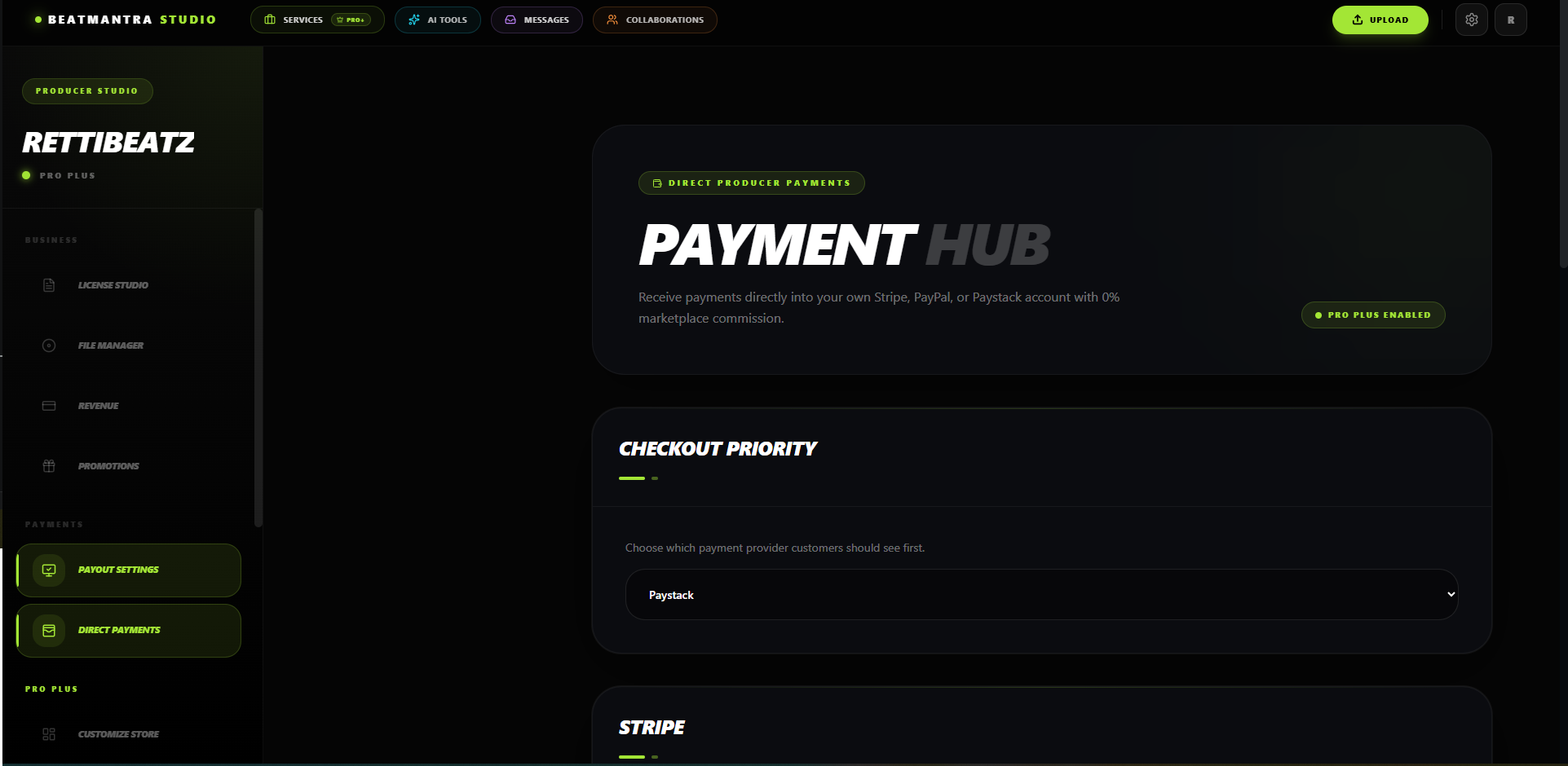
Supported Providers
BeatMantra supports payment integrations that may include Stripe, PayPal, and Paystack. Not every provider or payment method is available to every producer.
- Stripe: Available to eligible accounts where Stripe supports the business and country.
- PayPal: Available only where the relevant PayPal integration and transaction are supported.
- Paystack: Available for supported countries and payment flows. Ghanaian producers should use the Paystack options enabled for their accounts.
Before You Begin
- Confirm that your account and producer plan are eligible for the Direct Payments feature.
- Create or access an account with a supported payment provider.
- Complete any identity, business, and verification requirements imposed by that provider.
- Make sure your payment account is approved to accept the types of payments you intend to receive.
Configure Stripe
If Stripe is available for your account, open your Direct Payments settings and enter the credentials requested by the integration.
- Publishable Key: The public key used by supported Stripe integrations.
- Secret Key: The private API credential used for server-side operations.
Use credentials from the correct Stripe environment. Test credentials are for testing, while live credentials are required for live transactions where supported.
Configure PayPal
If PayPal is available in your Direct Payments settings, provide the fields requested by the integration. Depending on the implementation, these may include:
- PayPal account email address, where required.
- PayPal Client ID.
PayPal availability depends on the configured integration and the transaction being processed. Do not assume that PayPal is available for every country or checkout session.
Configure Paystack
If Paystack is available for your account, enter the credentials requested by the integration.
- Public Key
- Secret Key
Confirm that your Paystack account supports your intended payment flow and currency. Available currencies and payment methods vary by country and provider configuration.
Save and Verify Your Configuration
- Open your Direct Payments settings.
- Select a provider that is available to your account.
- Enter all required credentials.
- Save the configuration.
- Confirm that the settings are accepted and that your checkout offers the expected payment method.
Enter credentials only in the designated secure settings. Never share secret keys in support messages, screenshots, public repositories, or chat conversations.
What Happens If a Provider Is Not Configured?
A payment provider must be configured and enabled before it can process payments through your storefront. The checkout options available to buyers depend on your active configuration and the payment flow supported for that transaction.
Do not assume that a missing or incomplete provider configuration automatically activates another checkout method. Check your storefront's actual checkout settings and contact BeatMantra Support if no suitable payment method is available.
International Payments
International payment availability depends on the provider, the producer's country, the buyer's country, supported currencies, and the payment methods enabled for the transaction.
Connecting a provider does not guarantee that every international buyer will be able to pay. If a buyer cannot complete checkout, verify the available payment methods and currency before trying again.
Security Best Practices
- Never share secret API keys or private credentials.
- Keep credentials out of frontend code and public repositories.
- Use the correct test or live credentials for your environment.
- Rotate credentials immediately if they may have been exposed.
- Follow your payment provider's account security and verification requirements.
Troubleshooting
If your payment settings cannot be saved or buyers cannot complete checkout, verify that all required fields are complete, your credentials are correct, and your provider account is enabled for the intended payment flow.
If the problem continues, contact BeatMantra Support with a description of the issue and any non-sensitive transaction reference. Never send secret keys or full payment credentials.
Related Articles
BeatMantra Payouts
Configure your payout settings before publishing your first beat.
How to Get Your Stripe API Keys
Learn how to retrieve your Stripe publishable and secret API keys and connect Stripe to your BeatMantra Direct Payments page.
Custom Domains
Connect your own domain to your BeatMantra storefront.
Theme Customization
Customize your BeatMantra storefront to match your personal brand.